<?xml version="1.0" encoding="utf-8"?><feed xmlns="http://www.w3.org/2005/Atom" xml:lang="en"><generator uri="https://jekyllrb.com/" version="3.10.0">Jekyll</generator><link href="https://www.sean-orfila.com/feed.xml" rel="self" type="application/atom+xml" /><link href="https://www.sean-orfila.com/" rel="alternate" type="text/html" hreflang="en" /><updated>2026-08-07T17:15:38+00:00</updated><id>https://www.sean-orfila.com/feed.xml</id><title type="html">Sean Orfila</title><subtitle>Sean Orfila is an ecommerce engineer in the Pacific Northwest, working on online retail and Shopify storefronts.
</subtitle><author><name>Sean Orfila</name><email>hello@sean-orfila.com</email></author><entry><title type="html">Using MutationObserver to mimic AJAX in Shopify Themes</title><link href="https://www.sean-orfila.com/blog/shopify/using-mutation-observer-to-mimic-ajax-in-shopify-themes/" rel="alternate" type="text/html" title="Using MutationObserver to mimic AJAX in Shopify Themes" /><published>2019-09-29T00:00:00+00:00</published><updated>2019-09-29T00:00:00+00:00</updated><id>https://www.sean-orfila.com/blog/shopify/using-mutation-observer-to-mimic-ajax-in-shopify-themes</id><content type="html" xml:base="https://www.sean-orfila.com/blog/shopify/using-mutation-observer-to-mimic-ajax-in-shopify-themes/"><![CDATA[<p><a href="https://developer.mozilla.org/en-US/docs/Web/API/MutationObserver">MutationObserver</a> is a super handy tool in the front-ender’s toolbox – especially when it comes to Shopify themes. This is how I used it with the <a href="https://archetypethemes.co/products/streamline">Streamline theme</a> from Archetype – but it can certainly be applied to a bunch of other themes too.</p>

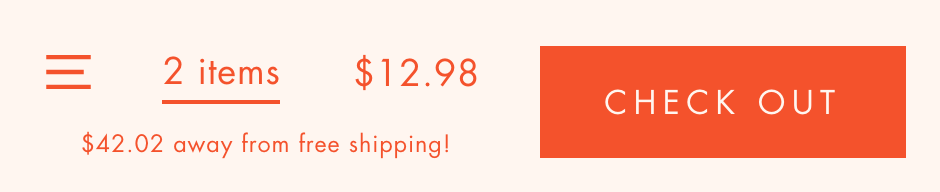
<p>Here’s how I created a countdown to free shipping using the Web API.</p>

<!--more-->

<p class="figure"><img src="/assets/img/blog/shopify-free-shipping-countdown.png" alt="Today's Goal" class="lead" data-width="800" data-height="100" />
The end goal for this task is creating a countdown for free shipping.</p>

<p>Shoutout to <a href="https://www.voltagenewmedia.com/">Voltage</a> for partnering with me on this solution.</p>

<hr />

<p><strong>Here’s the business logic:</strong> our customer spends $55, and her shipping is free. Our merchant needs a nice little message near the cart total showing the customer how much more they should spend to get free shipping.</p>

<hr />
<p>Archetype (arguably the top theme developers working with Shopify at the moment) has some nice <a href="https://archetypethemes.co/blogs/streamline/javascript-events-for-developers">javascript event listeners</a> baked into their themes. We have one for <strong>page load</strong>, another for <strong>cart updated</strong>, and even a <strong>product added to ajax cart</strong> event.</p>

<p><strong>The issue in this case was that none of these will work.</strong></p>

<p>This is because Archetype returns a <a href="https://help.shopify.com/en/themes/liquid/objects/product">Product Object</a> on the <strong>product added to Ajax cart</strong>.</p>

<p>The <strong>product object</strong> won’t help us… as it won’t give us the total which comes from the <strong>cart object</strong>, and the <strong>cart updated</strong> event will only work when the customer actually changes the quantity of a cart item from the <strong>cart page</strong>. Bummer!</p>

<p>Luckily, in the DOM, we have the cart price being updated dynamically via AJAX without a page refresh. Nice!</p>

<p>So, customer adds a product – price updates, and we have something to work with – a source of truth, if you will.</p>

<p>Here’s our markup:</p>

<figure class="highlight"><pre><code class="language-html" data-lang="html">  <span class="nt">&lt;a</span> <span class="na">href=</span><span class="s">"{{ routes.cart_url }}"</span> <span class="na">id=</span><span class="s">"StickyItems"</span><span class="nt">&gt;</span>{{ 'cart.general.item_count' | t: count: cart.item_count }}<span class="nt">&lt;/a&gt;</span> 
  
  <span class="c">&lt;!-- this is updated via theme JS, and changes dynamically already -- no refresh needed --&gt;</span>
  <span class="nt">&lt;span</span> <span class="na">id=</span><span class="s">"StickySubtotal"</span><span class="nt">&gt;</span>{{ cart.total_price | money }}<span class="nt">&lt;/span&gt;</span> </code></pre></figure>

<p>Our <code class="language-plaintext highlighter-rouge">MutationObserver</code> will watch the <strong>StickySubtotal</strong> span, and anytime it updates, we’ll run some functions to create our countdown and update the DOM in real-time. First, let’s add the markup to show the message:</p>

<figure class="highlight"><pre><code class="language-html" data-lang="html">    <span class="c">&lt;!-- if the cart count is over 0 --&gt;</span>
    {% if cart.items.size &gt; 0 %} 
    
        <span class="c">&lt;!-- set the free shipping goal in Shopify's money format --&gt;</span>
        {% assign shipping_value = 5500 %} 
        
        <span class="c">&lt;!-- output the shipping value to the DOM on page load and hide it --&gt;</span>
        <span class="nt">&lt;span</span> <span class="na">id=</span><span class="s">"shippingValue"</span> <span class="na">style=</span><span class="s">"display: none;"</span><span class="nt">&gt;</span>{{ shipping_value }}<span class="nt">&lt;/span&gt;</span> 
        
        <span class="c">&lt;!-- set the cart_total variable --&gt;</span>
        {% assign cart_total = cart.total_price %}
        
        <span class="c">&lt;!-- Subtract the cart_total from the shipping value (this only happens on load!) --&gt;</span>
        {% assign shipping_value_left = shipping_value | minus: cart_total %}
        
        <span class="c">&lt;!-- this is our free shipping msg that we'll update when they add an item --&gt;</span>
        <span class="nt">&lt;p</span> <span class="na">class=</span><span class="s">"shipping-savings-message"</span><span class="nt">&gt;</span>
       
        {% if shipping_value_left &gt; 0 %}
          <span class="nt">&lt;span&gt;</span>{{ shipping_value_left | money }}<span class="nt">&lt;/span&gt;</span> away from free shipping!
        {% else %}
          Awesome, you've got free shipping!
        {% endif %}
        
        <span class="nt">&lt;/p&gt;</span>
          
    {% endif %}
    </code></pre></figure>

<p>Now that we’ve got all of that brewing in the DOM, (and working on refresh), we can add our MutationObserver and begin updating the countdown.</p>

<figure class="highlight"><pre><code class="language-javascript" data-lang="javascript"><span class="o">&lt;</span><span class="nx">script</span><span class="o">&gt;</span>

  <span class="c1">// on page load (specific to archetype themes!)</span>
  <span class="nb">document</span><span class="p">.</span><span class="nx">addEventListener</span><span class="p">(</span><span class="dl">'</span><span class="s1">page:loaded</span><span class="dl">'</span><span class="p">,</span> <span class="kd">function</span><span class="p">()</span> <span class="p">{</span>
   
    <span class="c1">// build an observer for DOM mutations</span>
    <span class="kd">const</span> <span class="nx">MutationObserver</span> <span class="o">=</span> <span class="nb">window</span><span class="p">.</span><span class="nx">MutationObserver</span> 
                          <span class="o">||</span> <span class="nb">window</span><span class="p">.</span><span class="nx">WebKitMutationObserver</span> 
                          <span class="o">||</span> <span class="nb">window</span><span class="p">.</span><span class="nx">MozMutationObserver</span><span class="p">;</span>

    <span class="c1">// set the target to listen on</span>
    <span class="kd">const</span> <span class="nx">targetNode</span> <span class="o">=</span> <span class="nb">document</span><span class="p">.</span><span class="nx">getElementById</span><span class="p">(</span><span class="dl">'</span><span class="s1">StickySubtotal</span><span class="dl">'</span><span class="p">);</span> <span class="c1">// watch the sticky-cart's subtotal</span>
    <span class="kd">const</span> <span class="nx">shippingSavingsMessages</span> <span class="o">=</span> <span class="nb">document</span><span class="p">.</span><span class="nx">querySelectorAll</span><span class="p">(</span><span class="dl">'</span><span class="s1">.shipping-savings-message</span><span class="dl">'</span><span class="p">);</span>
 
    <span class="c1">// set the observer's config</span>
    <span class="kd">const</span> <span class="nx">config</span> <span class="o">=</span> <span class="p">{</span>
      <span class="na">attributes</span><span class="p">:</span> <span class="kc">true</span><span class="p">,</span>
      <span class="na">childList</span><span class="p">:</span> <span class="kc">true</span><span class="p">,</span>
      <span class="na">characterData</span><span class="p">:</span> <span class="kc">true</span><span class="p">,</span>
      <span class="na">subtree</span><span class="p">:</span> <span class="kc">true</span><span class="p">,</span>
    <span class="p">};</span>

    <span class="c1">// setup our mutation observer</span>
    <span class="kd">const</span> <span class="nx">observer</span> <span class="o">=</span> <span class="k">new</span> <span class="nx">MutationObserver</span><span class="p">(</span><span class="kd">function</span><span class="p">(</span><span class="nx">mutations</span><span class="p">)</span> <span class="p">{</span>
      
      <span class="c1">// for each mutation</span>
      <span class="nx">mutations</span><span class="p">.</span><span class="nx">forEach</span><span class="p">(</span><span class="kd">function</span><span class="p">(</span><span class="nx">mutation</span><span class="p">)</span> <span class="p">{</span>
        <span class="nx">console</span><span class="p">.</span><span class="nx">log</span><span class="p">(</span><span class="dl">'</span><span class="s1">mutation =</span><span class="dl">'</span><span class="p">,</span> <span class="nx">mutation</span><span class="p">);</span> <span class="c1">// help us see whats being mutated in the console</span>
        
        <span class="c1">// grab the target's inner HTML and regex it to output it into Shopify's money format</span>
        <span class="kd">let</span> <span class="nx">targetNodeValue</span> <span class="o">=</span> <span class="nx">targetNode</span><span class="p">.</span><span class="nx">innerHTML</span><span class="p">;</span>                               <span class="c1">// the StickySubtotal's value / innerHTML</span>
        <span class="kd">const</span> <span class="nx">subtotalFromMoney</span> <span class="o">=</span> <span class="nb">Number</span><span class="p">(</span><span class="nx">targetNodeValue</span><span class="p">.</span><span class="nx">replace</span><span class="p">(</span><span class="sr">/</span><span class="se">[\$</span><span class="sr">,.</span><span class="se">]</span><span class="sr">/g</span><span class="p">,</span> <span class="dl">""</span><span class="p">));</span> <span class="c1">// this takes $20.25 and regexes it to 2025</span>
        <span class="kd">const</span> <span class="nx">shippingValue</span> <span class="o">=</span> <span class="nb">document</span><span class="p">.</span><span class="nx">getElementById</span><span class="p">(</span><span class="dl">'</span><span class="s1">shippingValue</span><span class="dl">'</span><span class="p">).</span><span class="nx">innerHTML</span><span class="p">;</span> <span class="c1">// grabs the shipping value from the DOM</span>
        
        <span class="c1">// get the difference of the two values</span>
        <span class="kd">const</span> <span class="nx">priceDiff</span> <span class="o">=</span> <span class="nx">shippingValue</span> <span class="o">-</span> <span class="nx">subtotalFromMoney</span><span class="p">;</span> <span class="c1">// it's just math ok?</span>
        <span class="kd">const</span> <span class="nx">priceDiffToMoney</span> <span class="o">=</span> <span class="p">(</span><span class="nx">priceDiff</span><span class="o">/</span> <span class="mi">100</span><span class="p">).</span><span class="nx">toFixed</span><span class="p">(</span><span class="mi">2</span><span class="p">).</span><span class="nx">replace</span><span class="p">(</span><span class="sr">/</span><span class="se">\d(?=(\d{3})</span><span class="sr">+</span><span class="se">\.)</span><span class="sr">/g</span><span class="p">,</span> <span class="dl">"</span><span class="s2">$&amp;,</span><span class="dl">"</span><span class="p">);</span> <span class="c1">// this takes the difference and regexes it back into money! so 2025 would become 20.25</span>
        
        <span class="c1">// if the shipping value is more than the subtotal from money</span>
        <span class="k">if</span> <span class="p">(</span><span class="nx">priceDiff</span> <span class="o">&gt;</span> <span class="mi">0</span><span class="p">)</span> <span class="p">{</span>
         
          <span class="c1">// for each case where the shippings-saved-message appears</span>
          <span class="nx">shippingSavingsMessages</span><span class="p">.</span><span class="nx">forEach</span><span class="p">(</span><span class="kd">function</span><span class="p">(</span><span class="nx">shippingSavingsMessage</span><span class="p">)</span> <span class="p">{</span>
            <span class="c1">// edit the DOM and update the value of the shipping message</span>
            <span class="nx">shippingSavingsMessage</span><span class="p">.</span><span class="nx">innerHTML</span> <span class="o">=</span> <span class="dl">'</span><span class="s1">&lt;span&gt;$</span><span class="dl">'</span> <span class="o">+</span> <span class="s2">`</span><span class="p">${</span><span class="nx">priceDiffToMoney</span><span class="p">}</span><span class="s2">`</span> <span class="o">+</span> <span class="dl">'</span><span class="s1">&lt;/span&gt; away from free shipping!</span><span class="dl">'</span><span class="p">;</span> 
          <span class="p">})</span>
          
        <span class="c1">// if it's not, let's tell them they've got free shipping.</span>
        <span class="p">}</span> <span class="k">else</span> <span class="p">{</span>
          <span class="nx">shippingSavingsMessages</span><span class="p">.</span><span class="nx">forEach</span><span class="p">(</span><span class="kd">function</span><span class="p">(</span><span class="nx">shippingSavingsMessage</span><span class="p">)</span> <span class="p">{</span>
            <span class="nx">shippingSavingsMessage</span><span class="p">.</span><span class="nx">innerHTML</span> <span class="o">=</span> <span class="dl">"</span><span class="s2">Awesome, you've got free shipping!</span><span class="dl">"</span><span class="p">;</span>
          <span class="p">})</span>
        <span class="p">}</span>
      <span class="p">});</span>
    <span class="p">});</span>
    <span class="nx">observer</span><span class="p">.</span><span class="nx">observe</span><span class="p">(</span><span class="nx">targetNode</span><span class="p">,</span> <span class="nx">config</span><span class="p">);</span>
  <span class="p">});</span>
  
<span class="o">&lt;</span><span class="sr">/script&gt;</span></code></pre></figure>

<p>And that’s it! I’m sure there’s other ways to achieve this, and I’d love to hear how you’d approach this problem.</p>

<p>For now, we have a unique way to observe the cart object’s subtotal and have created a handy little message that engages our customer and upsells to free shipping.</p>]]></content><author><name>Sean Orfila</name><email>hello@sean-orfila.com</email></author><category term="shopify" /><summary type="html"><![CDATA[Using the Web API MutationObserver with JavaScript is super helpful for watching Shopify's cart object in real time without needing a page refresh.]]></summary><media:thumbnail xmlns:media="http://search.yahoo.com/mrss/" url="https://www.sean-orfila.com/assets/img/blog/eye1.jpg" /><media:content medium="image" url="https://www.sean-orfila.com/assets/img/blog/eye1.jpg" xmlns:media="http://search.yahoo.com/mrss/" /></entry><entry><title type="html">Improving Your Shopify Store’s Page Load Time</title><link href="https://www.sean-orfila.com/blog/shopify/how-to-speed-up-shopifys-page-load-time/" rel="alternate" type="text/html" title="Improving Your Shopify Store’s Page Load Time" /><published>2019-07-15T00:00:00+00:00</published><updated>2019-07-15T00:00:00+00:00</updated><id>https://www.sean-orfila.com/blog/shopify/how-to-speed-up-shopifys-page-load-time</id><content type="html" xml:base="https://www.sean-orfila.com/blog/shopify/how-to-speed-up-shopifys-page-load-time/"><![CDATA[<p>We see it all too often… a merchant decides to run their domain through an online page speed test and, shocked with the results, immediately assumes their entire business is burning to the ground.
<!--more--></p>

<p>Merchants with employees immediately divert underlings to solving the page load issues while the self-employed store owners frantically search for answers.</p>

<p>Those with little understanding of theme code begin <strong>scouring the Shopify App Store</strong>, reaching for anything that cools the flames of what is becoming a burning itch to have a faster Shopify store.</p>

<p>Third-party Apps peddling so-called “speed boosts” are hastily installed, and then, minutes later the same apps are un-installed after they’ve only shaved off a dismal millisecond (but not before they’ve re-written most of your <code class="language-plaintext highlighter-rouge">assets</code> folder into un-maintainable code).</p>

<h2 id="step-1-dont-trip">Step 1: Don’t Trip</h2>

<p>Before you call all-hands-on-deck, or imbibe in your own personal meltdown, there’s a bit more to understand about Shopify, page speeds, and what it all means for the long game.</p>

<p><a href="https://gtmetrix.com/">GTMatrix</a>, <a href="https://developers.google.com/speed/pagespeed/insights/">Google PageSpeedTest</a> or <a href="https://tools.pingdom.com/">Pingdom</a> each offer some popular tests. Try one out!</p>

<p>Psychologically, for merchants, running a site through these tests appeals to that <strong>inner gamer/social media addict</strong> in all of us.</p>

<p>Suddenly, all we care about is raising that grade. After all, business depends on it… right?</p>

<h2 id="lets-compare-some-notable-online-stores">Let’s compare some notable online stores</h2>

<p class="figure"><img src="/assets/img/blog/kyli.jpg" alt="Kylie's Score" class="lead" data-width="800" data-height="100" />
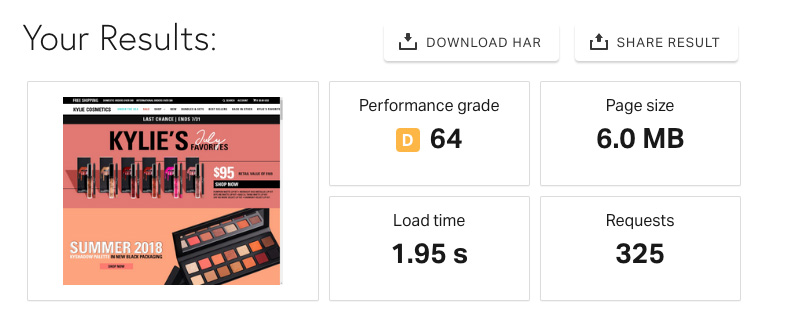
The fastest scaling ecommerce business in history isn’t passing any speed tests.</p>
<p>Take a deep breath, this might shock you… <strong><a href="https://apple.com">Apple.com</a> regularly scores an F</strong> (today it’s a <strong>C-</strong>), <strong><a href="https://shopify.com">Shopify’s homepage</a> is scoring a D</strong>, and the largest brands on Shopify (<a href="https://www.kyliecosmetics.com/"><strong>Kylie Cosmetics</strong></a> and <a href="https://fashionnova.com"><strong>FashionNova</strong></a>) are both <strong>scoring an E</strong> (worse than an F).</p>

<h2 id="important-takeaway">Important Takeaway</h2>
<p>These are some of the highest selling, most trafficked websites in online retail and they’re basically bombing the page speed test. Yet, they’re seeing <strong>millions of orders</strong> per year.</p>

<p>Am I saying it doesn’t matter? <strong>No!</strong> <code class="language-plaintext highlighter-rouge">Time to first paint</code> is a noble and meaningful pursuit, one worthy of your time! It even reduces your carbon footprint.
‍</p>
<h1 id="whats-actually-slowing-down-your-shopify-store">What’s actually slowing down your Shopify store?</h1>
<h2 id="1-apps">1. Apps</h2>
<p>Shopify – bless their Canadian hearts – are in the business of helping you sell. You pay them a monthly fee, they charge transaction fees, and they also earn revenue on Apps that you install from the Shopify App Store.</p>

<p>Shopify has good reason to push apps to merchants. They solve complex business problems, extend the platform, and generally keep the party going.</p>

<p>Every time you install an app, it should be absolutely critical that you NEED that app. For each app installed, you’re taking a performance hit – and that page load score? These apps are <strong>not</strong> helping.</p>

<blockquote class="lead">
  <p>Installing and uninstalling apps can have unintended ramifications and continue slowing down your site even after apps are uninstalled.</p>
</blockquote>

<p>For more reading, <a href="https://medium.com/vitals/shopify-page-speed-3a104b330624">checkout this amazing case study</a>.
‍</p>
<h2 id="2-carousels--sliders">2. Carousels &amp; Sliders</h2>
<p>Pre-built themes almost always include a big juicy image slider or carousel.</p>

<p>Often these sliders can be slow and dependent on external libraries which can dramatically delay page load time.</p>

<p>Do we need these carousels in 2019? Probably not. Can we better utilize <strong>the most important shopping display for your storefront</strong>? Absolutely.</p>

<blockquote>

  <p>Consider the segmentation and personalization possibilities on that slider’s real estate. What if, based on customer tags, you swapped that bloated, resource-eating slider for a single custom image?</p>
</blockquote>

<p>With Liquid and some HTML/CSS it’s possible to do this without a bulky app, and could be based on the customer’s buying history or site visits. (I’ll save the tutorial for another article).</p>

<h2 id="3-resource-requests">3. Resource Requests</h2>
<p>This one ties into #1. Apps make a ton of network requests and ideally your theme should have one CSS file and one JavaScript file (when compiled).</p>

<blockquote>

  <p>Apps typically add multiple JS and CSS files, and sometimes make multiple “handshakes” with even more libraries and scripts, compiling resource requests even more.</p>
</blockquote>

<p>This is when having a developer is vital for analyzing your theme’s network requests. If you don’t work with one already, <a href="mailto:hello@sean-orfila.com">get in touch</a>.
‍</p>
<h2 id="4-oversized-images">4. Oversized Images</h2>
<p>This is the low-hanging fruit. Big images will slow your roll and dramatically increase your page size and page load speed. A good goal is to keep each image under 50kb (max ~ 70kb for large images).</p>

<p>Shopify utilizes a CDN (content delivery network), and they do some basic image optimization, but you’ve really got to be mindful not to upload non-optimized images if you’re looking to run a fast website.</p>

<p>Try using something like <a href="https://imageoptim.com/mac">ImageOptim</a> or <a href="https://tinyjpg.com">TinyJPG</a> to help compress your images.</p>

<h2 id="5-your-store-bought-theme">5. Your Store-bought Theme</h2>
<p>Most themes were built on JQuery and pre-built themes usually include a “kitchen sink” type of codebase to satisfy the vast amount of merchants that want vastly different features.</p>

<p>With a custom theme, you can <a href="https://github.com/the-couch/slater-theme">use something like Slater</a> that uses the latest ES6 code and things like <a href="https://github.com/estrattonbailey/operator">operator</a> to help your theme run blazing fast.</p>

<p>With that speed comes some custom features specific to your business. A design based on detailed UX research and your store’s analytics is a powerful way to find some positive ROI.</p>

<h2 id="conclusions">Conclusions</h2>
<p>The most important thing is to take the page speed test with a grain of salt (and don’t freak out). Secondly, take a long hard look at that list of installed apps. Get rid of <strong>everything</strong> that isn’t vital to your business, and seek help if you need an audit. <a href="mailto:hello@sean-orfila.com">My inbox is open</a>, or drop a comment below!</p>]]></content><author><name>Sean Orfila</name><email>hello@sean-orfila.com</email></author><category term="shopify" /><summary type="html"><![CDATA[Your Shopify store is running slow. The most likely culprit? **Third-party Apps**]]></summary><media:thumbnail xmlns:media="http://search.yahoo.com/mrss/" url="https://www.sean-orfila.com/assets/img/blog/slow.jpg" /><media:content medium="image" url="https://www.sean-orfila.com/assets/img/blog/slow.jpg" xmlns:media="http://search.yahoo.com/mrss/" /></entry><entry><title type="html">A Pure CSS Accordion for Shopify Pages</title><link href="https://www.sean-orfila.com/blog/shopify/how-to-create-an-faq-accordion-in-shopifys-page-editor/" rel="alternate" type="text/html" title="A Pure CSS Accordion for Shopify Pages" /><published>2019-01-20T00:00:00+00:00</published><updated>2019-01-20T00:00:00+00:00</updated><id>https://www.sean-orfila.com/blog/shopify/how-to-create-an-faq-accordion-in-shopifys-page-editor</id><content type="html" xml:base="https://www.sean-orfila.com/blog/shopify/how-to-create-an-faq-accordion-in-shopifys-page-editor/"><![CDATA[<!-- Begin Accordion Snippet -->
<style>
  .so-tab {
    position: relative;
    width: 100%;
    overflow: hidden;
    margin: 25px 0;
  }
  .so-tab label {
    position: relative;
    display: block;
    padding: 0 25px 0 0;
    margin-bottom: 15px;
    line-height: normal;
    cursor: pointer;
  }
  .so-tab input {
    position: absolute;
    opacity: 0;
    z-index: -1;
  }
  .so-tab-content {
    max-height: 0;
    overflow: hidden;
    transition: max-height .35s;
  }
  /* :checked */
  .so-tab input:checked ~ .so-tab-content {
    max-height: none;
  }
  /* Icon */
  .so-tab label::after {
    position: absolute;
    right: 0;
    top: 0;
    display: block;
    -webkit-transition: all .35s;
    -o-transition: all .35s;
    transition: all .35s;
  }
  .so-tab input[type=checkbox] + label::after {
    content: "+";
  }
  .so-tab input[type=radio] + label::after {
    content: "\25BC";
  }
  .so-tab input[type=checkbox]:checked + label::after {
    transform: rotate(315deg);
  }
  .so-tab input[type=radio]:checked + label::after {
    transform: rotateX(180deg);
  }
</style>

<div class="so-accordion-wrapper">
  <div class="so-tab">
    <input id="so-tab-1" type="checkbox" name="tabs" />
    <label for="so-tab-1"><u>Click Me. I'm an accordion.</u></label>
    <div class="so-tab-content">
      <blockquote>
        <p>Well hello there buddy... click on that there title one more time and fold this thing back up! Otherwise, here's a bunch more text that would go on and on til the break of dawn.</p>
        <p>Here we are, reading placeholder, holding hands, together. Forever. And ever. And ever. And ever.</p>
        </blockquote>
    </div>
  </div>
</div>
<!--more-->

<p><br /></p>

<p><strong>Note:</strong> The following code snippet is <strong>pure html/css</strong> and does not require javascript or jquery. It should inherit your theme’s style.</p>

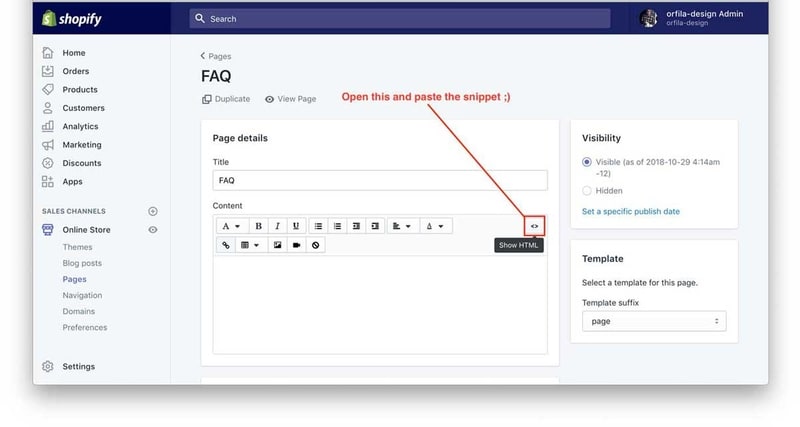
<h2 id="step-1-copypaste-this-code-into-shopify">Step 1: Copy/Paste <a href="#source-code">this code</a> into Shopify</h2>
<p><img src="/assets/img/blog/step1.jpg" alt="Full-width image" /></p>

<h2 id="step-2-save-the-page-view-the-frontend">Step 2: Save the page. View the frontend.</h2>

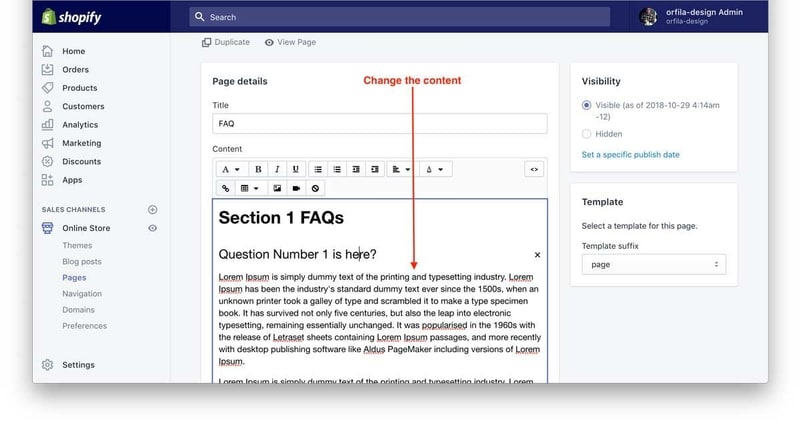
<h2 id="step-3-change-the-content">Step 3: Change The Content</h2>
<p><img src="/assets/img/blog/step2.jpg" alt="Full-width image" /></p>

<hr />

<div style="position: relative; padding-bottom: 62.5%; height: 0;"><iframe src="https://www.loom.com/embed/f52d3de3ef9b4635b6766b3a8a244cfc?autoplay=1" frameborder="0" webkitallowfullscreen="" mozallowfullscreen="" allowfullscreen="" style="position: absolute; top: 0; left: 0; width: 100%; height: 100%;margin-bottom:25px;"></iframe></div>
<h2 id="source-code">Source Code</h2>
<script src="https://gist.github.com/seandogg/ed55076b8913235bda1aa79f34cffe90.js"></script>]]></content><author><name>Sean Orfila</name><email>hello@sean-orfila.com</email></author><category term="shopify" /><summary type="html"><![CDATA[In web development, an `accordion` is something that expands on a user's click.]]></summary><media:thumbnail xmlns:media="http://search.yahoo.com/mrss/" url="https://www.sean-orfila.com/assets/img/blog/accordion.gif" /><media:content medium="image" url="https://www.sean-orfila.com/assets/img/blog/accordion.gif" xmlns:media="http://search.yahoo.com/mrss/" /></entry></feed>